Bible Word Scramble
Unscramble books of the Bible, names and Bible words online, or print the puzzle with an answer key for Sunday school.
This free Bible word scramble tool makes scrambled-letter puzzles from Bible word lists, and it runs in your browser. Choose a list such as Books of the Bible, Bible People, Bible Words, Christmas Traditions or Easter, or type your own words, then print a worksheet or solve the puzzle on screen. No account or sign-up is needed, and nothing you type is uploaded. It works on phones and tablets, and every sheet can come with an answer key.
It suits Sunday school warm-ups, youth group games, classroom spelling and family quizzes. The tool scrambles the letters of single words and short phrases. It does not scramble the order of words in a Bible verse. Everything you make here is free to use in Sunday school or in products you sell, such as Etsy printables or KDP activity books.
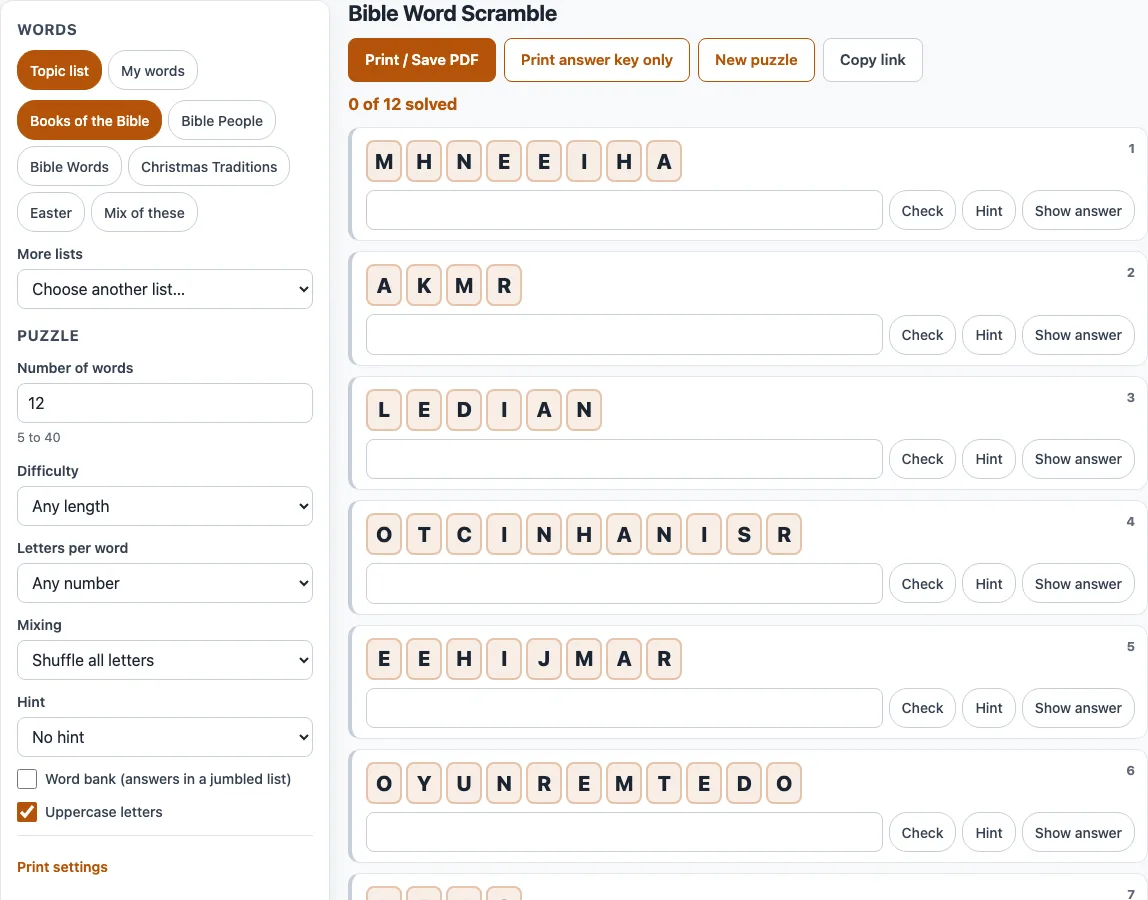
How to make a Bible word scramble
- Choose your words. Under Word source, click a chip in Topic list. If you pick more than one chip, click ‘Mix of these’ to use all of them. For other lists, open ‘More lists’. To use your own words, switch to ‘My words’ and type them into ‘Your words’.
- Set ‘Number of words’ from 5 to 40.
- For topic lists, set ‘Difficulty’. To fix the length of each word, set ‘Letters per word’.
- Choose ‘Mixing’: ‘Shuffle all letters’, or ‘Keep first and last letter’ for an easier puzzle.
- Choose a ‘Hint’ setting: No hint, First letter, First and last letter, or Number of letters.
- Tick ‘Word bank (answers in a jumbled list)’ if you want the answers shown under the puzzle. Leave ‘Uppercase letters’ on or turn it off.
- In the print settings, set the ‘Worksheet title’, ‘Paper size’, ‘Columns’, ‘Font size’ and ‘Copies’.
- Click ‘Print / Save PDF’. In the browser’s print dialog, choose Save as PDF to keep a file. To print only the answers, click ‘Print answer key only’.
- To solve on screen instead, type each answer and press Enter or ‘Check’. Press ‘Hint’ for one more starting letter, or ‘Show answer’.
‘New puzzle’ gives a new scramble and word choice with the same settings. ‘Copy link’ saves every setting and the puzzle number, so the same puzzle reopens from the link.
Can I get a Bible word scramble with answers?
Yes. Tick ‘Word bank (answers in a jumbled list)’ to show every answer in mixed order under the puzzle, or turn on ‘Include an answer key page’ to print an answer page after each copy. The scrambles follow fixed rules: the scrambled letters always differ from the word, the scramble is never another real word, and for words of 4 or more letters at most half the letters stay in their original place when possible. For example, GENESIS becomes NGEEISS and SHEPHERD becomes SREHPHDE.
How do I use a books of the bible scramble to memorise the order?
Use it to learn the spelling of the book names. The puzzle picks books in a random order, so it does not drill the sequence itself; learn the order separately and use the puzzle to lock in each name. Start with a small ‘Number of words’, such as 5, and ‘Hint’ set to First letter. The list has 56 entries because numbered books such as 1 and 2 Samuel, Kings and Corinthians appear once, without the number.
Can I run a Bible scramble game for Sunday school or youth group?
Yes. Online, each word has letter tiles and a progress line such as ‘7 of 10 solved’, and the timer starts at the first action, so people can race each other. For a group, set ‘Copies’ from 1 to 30. Each copy has the same words in a different order with different scrambles, labelled Version 1, Version 2 and so on.
Can I scramble a Bible verse?
Not on this page. This page scrambles the letters of single words and short phrases, and it does not change the order of words in a verse. To rearrange the words of a verse, type the verse into the Sentence scramble maker instead.
Can I add names from this week’s lesson?
Yes. Type the names into ‘My words’, one per line, or separate them with commas or semicolons. Each entry can be up to 30 characters, using letters, spaces, hyphens and apostrophes, and you can enter up to 200 entries.
Frequently asked questions
Can I sell Bible word scramble printables on Etsy or in a KDP book?
Yes. The Bible word scrambles you make here are royalty-free for personal, classroom and commercial use, including KDP books, Etsy printables, Teachers Pay Teachers and print-on-demand products. No credit is required, and the only thing you may not do is copy the generator or the site itself to run a competing service. See the terms for details.
Do I need an account, and is what I type uploaded?
No account or sign-up is needed, and nothing you type is uploaded. It works on phones and tablets, and every sheet can come with an answer key. Everything runs in the browser, and nothing you type is uploaded.
Why was an entry left out of my puzzle?
The tool lists each skipped entry with its reason. The reasons are: too long (over 30 characters), other characters, fewer than 2 letters, already in the list, over 200 entries, or cannot be scrambled into a different order. Edit the entry to fix the problem, then it can be used.
Can a different word count as correct when solving online?
Yes. If you type a different real word made of the same letters, such as ANGLE for ANGEL, it counts as correct and the message names the list word. 406 of the 2,135 single-word list entries have such alternates. Words you add in ‘My words’ are not checked against a dictionary.
How do I get the same puzzle back later?
Click ‘Copy link’. The link stores every setting and the puzzle number, so it reopens the same puzzle. Your own words are stored in the part of the link after the #.
Related tools
- Sentence scramble maker: use it when you want to rearrange the words of a sentence or verse.
- Easter word scramble: use it for Easter-themed word puzzles.
- Christmas word scramble: use it for Christmas-themed word puzzles.
- Printable word scramble worksheets: use it when you want worksheets ready to print.
- Word scramble generator: use it to make a scramble from any word list.
- Easy word scramble for kids: use it for younger players who need simpler puzzles.
- Word scramble with answers: use it when you want an answer key with every puzzle.