Spring Word Scramble
Unscramble spring words online, or print a spring word scramble sheet with its answer key.
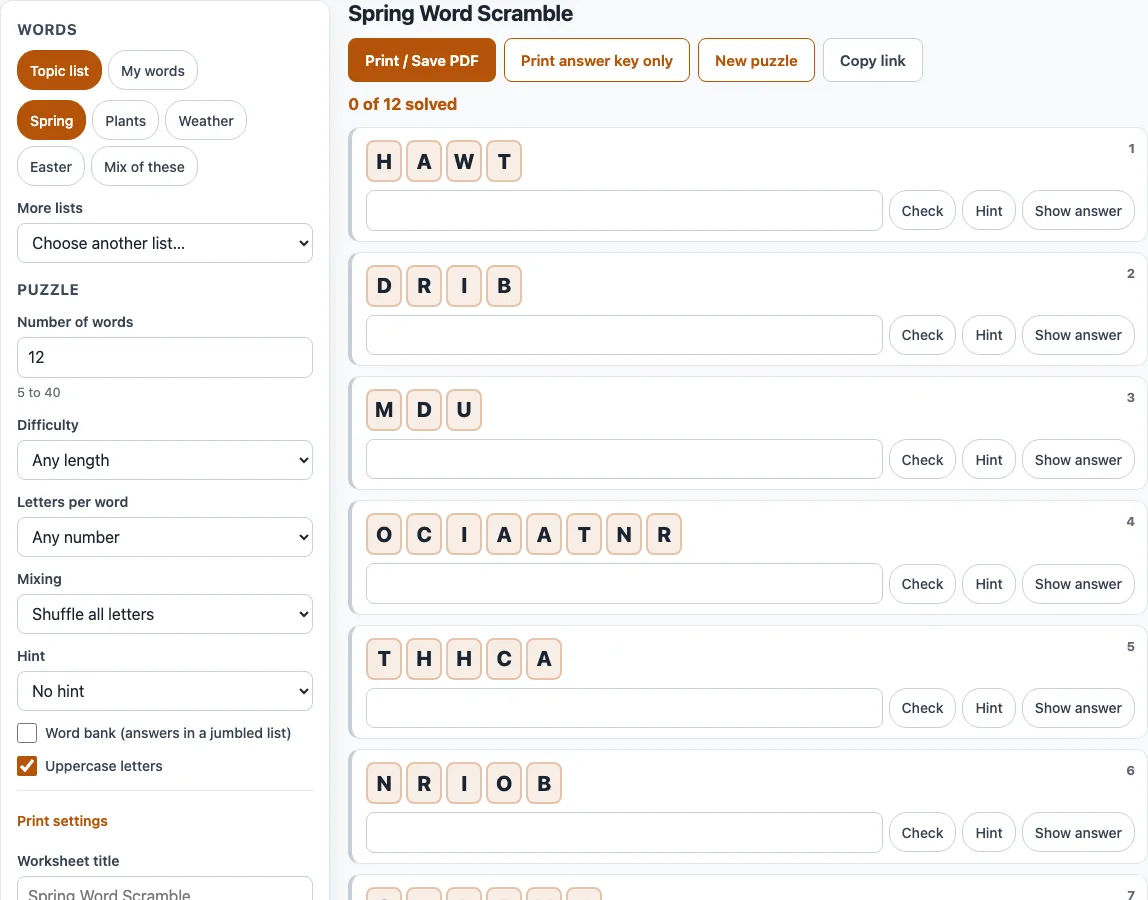
How to make a spring word scramble
- Choose your words. Under ‘Topic list’, click a chip such as Spring. If you pick more than one chip, click ‘Mix of these’ to use all of them. To see every list on the site, open ‘More lists’.
- Or click ‘My words’ and type your own words into ‘Your words’, one per line or separated by commas or semicolons.
- Set ‘Number of words’ from 5 to 40.
- For topic lists, set ‘Difficulty’ and, if you want, ‘Letters per word’.
- Choose ‘Mixing’: ‘Shuffle all letters’ or ‘Keep first and last letter’.
- Choose a ‘Hint’ option. Turn ‘Word bank’ on if you want the answers listed in mixed order under the puzzle.
- For a printout, set the ‘Worksheet title’, ‘Paper size’, ‘Columns’, ‘Font size’, ‘Copies’ and ‘Include an answer key page’, then click ‘Print / Save PDF’.
- To solve on screen instead, type each answer and press Enter or ‘Check’. Use ‘Hint’ or ‘Show answer’ when you are stuck.
Click ‘New puzzle’ for a new scramble with the same settings, or ‘Copy link’ to save every setting and the puzzle number. ‘Print answer key only’ gives you the key without the worksheet. To give each student a different sheet, set ‘Copies’ up to 30 and each copy is scrambled differently.
How does a spring word scramble with answers work?
Each word is shown as its own letters in a different order. The tool follows set rules so the puzzle stays fair: the scrambled letters are never the same as the word, and the scramble is never another real English word made of the same letters. Words of 4 or more letters keep at most half of their letters in the original place when possible. Phrases are scrambled one word at a time, and the space stays where it is.
For example, DAFFODIL from the Spring list can appear as ODAFDLIF, and RAINBOW can appear as RBIANWO. Both are shuffled with ‘Shuffle all letters’.
Spring vocabulary for a class unit (plants, weather): which lists fit?
The Plants and Weather lists match a spring science unit. Plants covers seed, root, stem, leaf, petal, bud, branch and pollen. Weather covers sunny, cloudy, rainy, windy, foggy, stormy and thunder. Pick the Plants or Weather chip on its own, or ‘Mix of these’ to combine all four lists on this page (Spring, Plants, Weather and Easter).
Students can use the answer key to check their own work. Turn on ‘Include an answer key page’ before you print, or use ‘Print answer key only’ for a quick copy.
An easy spring word scramble for kids: what settings help?
Start with ‘Difficulty’ set to Easy, which uses words of 3 to 5 letters. Then set ‘Mixing’ to ‘Keep first and last letter’. Only the middle letters move, so the word is easier to recognise.
Add a ‘Hint’ of First letter or First and last letter if the group is new to unscrambling. A ‘Letters per word’ setting of 4 or 5 keeps the words short and even.
Can I print a spring word scramble in A4?
Yes. The default paper size is Letter (8.5 × 11 in), so change ‘Paper size’ to A4 before you print. Set ‘Columns’ to 1 or 2 and ‘Font size’ to Normal or Large to fit the page.
Set ‘Copies’ from 1 to 30. Each copy has the same words in a different order with different scrambles, labelled ‘Version 1’, ‘Version 2’ and so on. This helps when students sit next to each other. Then click ‘Print / Save PDF’ and choose Save as PDF in the browser’s print dialog if you want a file.
Frequently asked questions
Can I print a spring word scramble with answers?
Yes. Turn on ‘Include an answer key page’ and the tool adds an answer page after each copy. It lists the scrambled letters and the answer for every word. You can also click ‘Print answer key only’ to print the key alone.
Will the online checker accept other words that use the same letters?
Yes. If you type a different real word made from the same letters, it counts as correct, and the message shows the list word. For example, ANGLE is accepted when the list word is ANGEL. Words you type yourself are not checked against a dictionary.
Are these spring word scrambles free for commercial use?
Yes. The spring word scrambles you make here are royalty-free for personal, classroom and commercial use, including KDP books, Etsy printables, Teachers Pay Teachers and print-on-demand products. No credit is required, and the only thing you may not do is copy the generator or the site itself to run a competing service. See the terms for details.
Do I need an account, and does it work on a phone?
No account or sign-up is needed. Everything runs in the browser, and nothing you type is uploaded. The tool works on phones and tablets, and printing works from any browser.
Related tools
- Easter word scramble: use this for words about Easter, such as the Easter list on this page.
- St. Patrick’s Day word scramble: use this for a March holiday puzzle with a different theme.
- Summer word scramble: use this for the next season’s vocabulary after your spring unit.
- Science and animal word scramble: use this when your class is studying animals or science topics.
- Printable word scramble worksheets: use this to browse ready-to-print worksheets on other themes.
- Easy word scramble for kids: use this for younger players who need simpler words.
- Word scramble generator: use this to make a scramble from any topic, not only spring.