Today's Jumble Puzzle
Unscramble four words, then use the circled letters to answer today's riddle. A new puzzle every day.
Recent
Your last 10 settings, saved only in this browser. Nothing is uploaded.
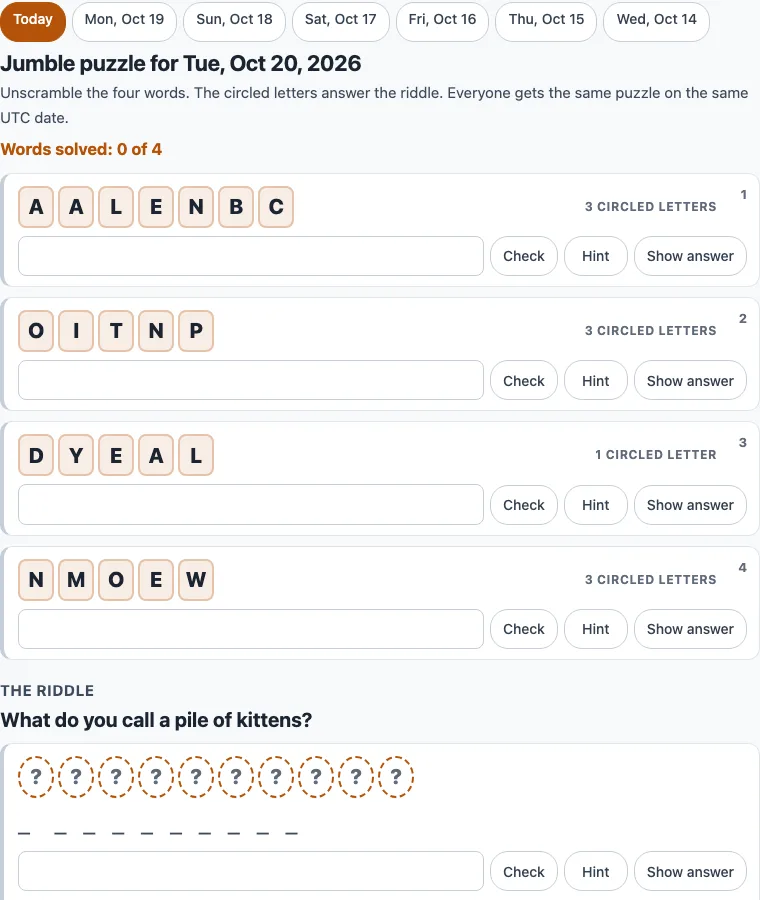
How to play today’s Jumble
- Open the page. Today’s puzzle loads by default. To visit a recent day, press its button above the puzzle, or use a link ending in ?d=YYYY-MM-DD.
- Start with the word that looks easiest. Type your answer in its answer box and press Enter, or press Check. Enter moves you to the next unsolved row.
- If you are stuck, press Hint. Each press shows one more starting letter, such as b _ _ _ _ _ _. Show answer fills in the word, but the word counts as shown, not solved.
- When you solve a word, its tiles show the real word and the circled letters appear inside circles. These collect in the riddle box, with a ‘?’ for each letter from words you have not solved yet.
- Use the blanks under the riddle to count the answer’s word lengths. Type your guess and press Check. You can guess before all four words are solved.
- When the riddle is correct, the page shows ‘You solved today’s Jumble.’
Press Check all to check every typed word and the riddle box at once. Show answers displays each answer beside its row without marking it solved, and Hide answers turns that off. Print / Save PDF prints the puzzle; open Print settings to choose Letter or A4 paper and to turn the answer page on or off. Print answer key only prints just the answers, and Copy link copies a link that opens the puzzle you are viewing.
How do you solve the Jumble puzzle?
Unscramble each word, then unscramble the circled letters to get the riddle’s answer. Solve the easiest words first, and look for common endings and letter pairs such as TH, CH, ER and ING. Once you have two or three words, the circled letters and the word lengths shown as blanks under the riddle narrow down the answer.
For example, on the past day 2026-10-19, the words were PECOPR (COPPER), GTUHOB (BOUGHT), OAUCCTN (ACCOUNT) and UODANR (AROUND). The circled letters, O P P O H T C U T A O, unscramble to POUCH POTATO, the answer to ‘What do you call a lazy kangaroo?’
Is this the newspaper Jumble or the Chicago Tribune Jumble?
No. This is an original puzzle made by this site. It is not the Jumble that runs in newspapers, it has no cartoon, and it never contains or reveals any newspaper’s puzzle or answer.
When does today’s Jumble change?
A new puzzle starts at 00:00 UTC. Because the puzzle follows the UTC date, the change may happen at a different local time where you live. A tick on the day buttons shows which days you have finished.
Can I play yesterday’s Jumble?
Yes, if it is one of the last six days. Today and the 6 days before it are open through the day buttons above the puzzle, or with a ?d=YYYY-MM-DD link. Older dates and future dates show today’s puzzle with a short note.
Can I print today’s Jumble with the answers?
Yes. Press Print / Save PDF, and the printed puzzle includes boxes for each word and the riddle. The answer page is added after the puzzle by default, so turn off ‘Add the answer page after the puzzle’ if you want the puzzle only. To print just the answers, use Print answer key only.
Is it free, and is anything uploaded?
It is free and needs no account. Your progress is saved in your own browser for each day, so you can leave and return. Nothing you type is uploaded.
Where do I find the answers to the newspaper Jumble?
This page cannot give answers to newspaper Jumble puzzles. If you are stuck on scrambled letters from any puzzle, the Jumble solver on this site unscrambles words you type and works out the final answer from circled letters: Jumble solver.
Frequently asked questions
Will everyone get the same puzzle today?
Yes. The puzzle is worked out in your browser from the UTC date, so everyone who opens the page on the same UTC date gets the same four words and riddle. There is no server, so the puzzle does not depend on who you are.
What happens if I press Show answer?
The word fills in and counts as shown. When the riddle is finished, the page says the puzzle is finished and that some answers were shown. The riddle can still be solved or shown the same way.
Can I stop and come back later?
Yes. Your progress for each day is saved in your own browser, so you can leave the page and return to the same puzzle. Clearing your browser data removes it.
Can I use my printouts in class?
Yes. Printouts are yours to use for personal, school, classroom and business purposes. The only limit is that you may not resell the printouts as a stand-alone product. No credit line is required.
Why does the riddle say ‘Not yet’?
The message ‘Not yet. The answer has N letters.’ means your guess has the wrong number of letters. Check the blanks under the riddle and try again. A different message, ‘Not quite. Try again.’, means the letter count is right but the answer is not.
Related tools
- Jumble solver: use it when you are stuck on scrambled letters from any puzzle and want the words unscrambled.
- Daily scramble puzzle: use it if you want another new word puzzle each day.
- Word scramble game: use it to play word unscrambles without the riddle step.
- Jumble crossword: use it when you want a crossword that uses Jumble-style clues.
- Anagram puzzles: use it to practise rearranging letters into words.
- Difficult word scramble: use it when you want longer or trickier scrambles.
- Scramble letters (word scrambler): use it to rearrange the letters of any word you type.